How to Drive in Bus Simulator 27
Power, bus-computer login, doors, stops, passengers, mirrors, timetable pressure, and city versus coach rhythm.
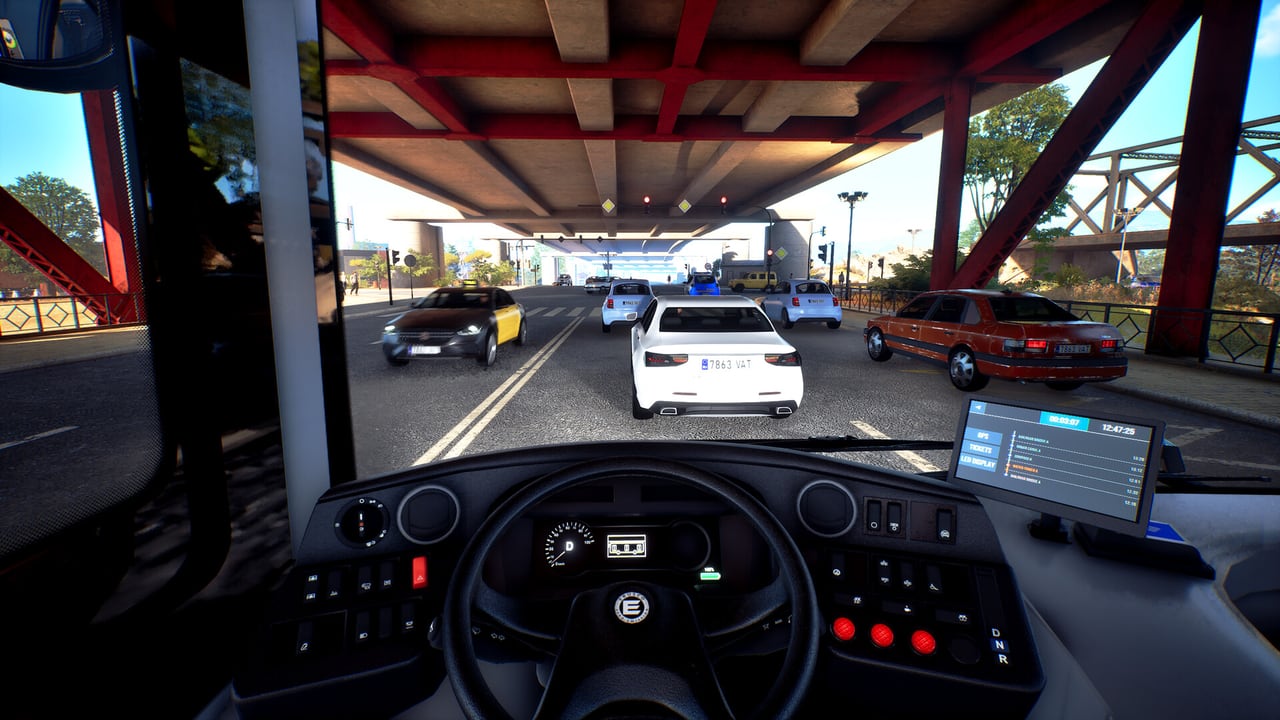
Driving in Bus Simulator 27 is a service loop, not a racing start. You power the cab, set drive mode, log into the bus computer so the line is live, then work doors, passengers, and a timetable through traffic that can include accidents and roadworks. The Steam demo is where this loop is playable today; the 8 September 2026 full launch adds the rest of the fleet and the company layer. Keys for each step sit on the controls page. This page is the order you use them.
If you have not finished the tutorial, do that first via the demo walkthrough. The tutorial is the only guided pass through ignition, drive mode, and the computer.
Start the bus
Sit in the driver’s seat. Power or ignition comes first — the cab electronics and the traction system are not the same press as “go.” On the Solaris Urbino 12 electric, set drive mode to Drive (F7 in the demo keyboard layout). Neutral (F8) and Reverse (F10) exist; a conventional gearbox does not. Gear up/down (R/F) is for vehicles that still have gears, including coaches you will meet later.
Keep the parking brake on until the doors are closed and you are actually leaving. Keep the front door closed while moving; the tutorial treats that as a safety rule. Lights and air conditioning are present in the binding list if the weather or the time of day needs them — Felicia Bay runs a full day/night cycle and dynamic weather.
If the bus does not roll, check three things before you rebind keys: drive mode is Drive, parking brake is off, and you are not still in the pause menu. Electric city buses also have a battery cycle (I). You are not stalling a diesel in the demo city cab.
Serve a line (bus computer)
Serving a line is a computer login, not just driving the painted road. Official demo guidance is explicit: log into the bus computer to start the service so the line number and last stop show on the bus display. Passengers cannot tell which line you are if that display is blank. GPS is optional for veterans and useful for everyone on a first Mequina loop or the coach toward Alcaztelar.
The computer is also how you track progress and timing. A clean cab with the parking brake off is still not “on the line” until login. When the mission ends, follow the logout or depot prompt instead of walking off mid-service; the demo scores the route you were asked to serve.
Doors, stops, and passengers
Approach the stop in a straight line. Brake early enough that you do not lunge the standing passengers. Parking brake on. Open the door the stop actually needs — individual keys 1–5 in the city, 6 only when you want every door. Wait. Do not close on a boarding animation. If a wheelchair user is part of the stop, deploy the ramp, wait for the complete boarding, then stow it before you take the brake off.
In-bus events are part of the design: you are expected to look after passengers, not only the kerb line. Traffic events sit outside the glass — heavy traffic, accidents, and roadworks can force a detour. Do not invent a scripted list of interior events; handle whatever the current mission throws, then get back on the timetable.
You can also play as a passenger or an inspector in the full game, which is the easiest way to watch stop spacing without managing the cab. Those roles are not a substitute for learning doors. See multiplayer if you want a friend on ticket check while you drive.
Mirrors, camera, and traffic
Use the side mirrors before you leave a stop. The demo cities are crowded; Unreal Engine 5 traffic is a feature, not background. Indicate (Q/E) before you pull out. Check the right-hand mirror on a city rigid, then check it again on a coach because the Tourismo occupies more of the next lane than the Urbino 12.
Tab opens the map if you lose the next stop. Esc pauses if you need to rebind. A speed limiter exists in the binding list — bind it before the coach mission so a downhill toward Alcaztelar does not become a guessing game. Wheel users should confirm force feedback and camera look in steering wheels; wheel support is still being polished toward launch.
Timetable pressure
The computer is the clock. Early is wait time; late is standing passengers and a compressed run to the next stop. Do not skip door procedure to “catch up.” Recover on the move by being smoother, not by rolling through a stop. City Drive in Mequina punishes messy doors. The coach punishes messy speed.
At launch, hired drivers and player-made timetables join this loop through company management. The demo will not let you edit the timetable; it will only let you fail it.
City driving versus coach driving
City: Solaris Urbino 12 electric, one Mequina district, frequent stops, narrow streets, battery cycle, individual doors, ramp use, tight mirrors. You are a transit driver. Read city buses and electric buses when you start thinking beyond the demo rigid.
Coach: Mercedes-Benz Tourismo on Mequina–Alcaztelar and the return. Fewer stops, higher speed, longer vehicle, scenery that shifts from coast toward mountains. Brake earlier. Use the limiter. Think in kilometres, not city blocks. Coach routes and the coach fleet page cover the Tourismo, Scania Irizar i8, and MAN Lion’s Coach — only the Tourismo is playable in the demo.
Do not copy city door habits onto a coach lay-by, and do not copy coach cruise speed into Mequina’s old streets. The guides hub splits those jobs on purpose.
After the first clean line
Once you can start, log in, complete a city loop, and finish a coach leg without guessing a door key, you are past the cab exam. Next reads depend on the job you liked. Map people go to Felicia Bay. Company people wait for the full game and read management plus Getting Started edition notes. Groups bookmark multiplayer.
Graphics stutters during this practice are a settings problem more often than a skill problem. DLSS and FSR arrived in the 18 June 2026 demo patch; use graphics settings rather than lowering every slider blind.
A clean line is boring to watch and correct to play: power, Drive, computer, doors, mirrors, timetable, ramp when needed, depot. When 8 September 2026 opens the rest of the licensed fleet, that loop does not change — only the bus around it does.
Frequently Asked Questions
Quick answers about Bus Simulator 27.
Why will my Bus Simulator 27 demo bus not move?
Check drive mode (F7 Drive on the demo keyboard), parking brake, and bus-computer login. The Urbino 12 electric has no conventional gearbox. See controls for the key list.
Do I have to log into the bus computer?
Yes, if you are serving a line. Login puts the line number and last stop on the display so passengers can identify the bus. Free driving without login is not the same as being on service.
When do I use the wheelchair ramp?
When a stop includes a passenger who needs it. Deploy, wait for boarding to finish, stow the ramp, then release the parking brake. Do not roll with the ramp out.
How is city driving different from coach driving?
City work is stop-dense and door-heavy in Mequina. Coach work is longer, faster, and uses the Tourismo on Mequina–Alcaztelar. Read coach routes before the intercity missions.
Do in-bus events change the controls?
No. They change your attention. Keep the service loop — doors, brake, computer — and deal with the event, then recover the timetable. Traffic accidents and roadworks can also force a new path.
Where should I practice this loop?
The Steam demo tutorial, then City Drive, then one coach leg. That is the only playable cab exam until the 8 September 2026 full launch.